Deal Scanner
Know if a salvage car is a good deal BEFORE you bid. Instant profit analysis, auction history, and repair estimates for Copart & IAAI.
Install Free from Chrome Web Store Get Early Access UpdatesSee It In Action
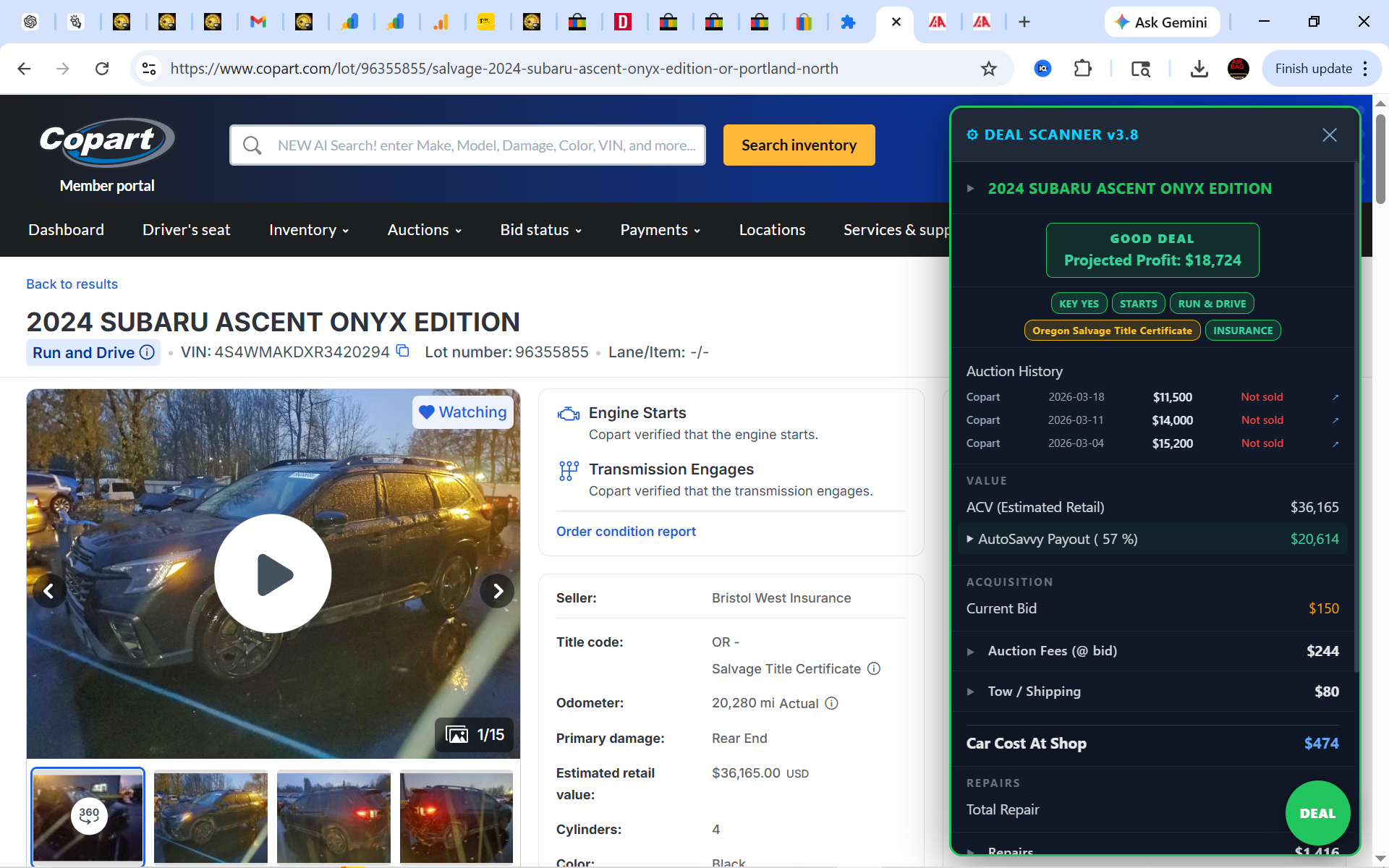
Here’s what Deal Scanner looks like on a real Copart listing. Every section is explained below.
What Every Section Shows You
Each part of the Deal Scanner panel gives you a specific piece of the puzzle.
1 Deal Rating Badge
The big badge at the top — GOOD DEAL (green), FAIR DEAL (yellow), or BAD DEAL (red). Tells you instantly whether this car is worth bidding on. Also shows the projected profit in dollars (e.g., “Projected Profit: $18,724”).
2 Vehicle Status Badges
Color-coded badges showing: KEY YES/NO, Title type & state (e.g., Oregon Salvage Title Certificate), STARTS (engine starts), RUN & DRIVE, and INSURANCE seller (green = insurance company, red = private seller).
3 Auction History
Shows every time this car has been listed before — the auction site, date, final bid amount, and whether it sold or not. In the example, this Subaru was listed 3 times and didn’t sell — meaning the price is dropping and you have leverage.
4 Value Section
ACV (Actual Cash Value) — the estimated retail value of the car if it were clean title. AutoSavvy Payout — what a wholesaler like AutoSavvy would pay (typically 55-60% of ACV). This is your realistic resale ceiling.
5 Acquisition Costs
Everything it costs to get the car to your shop: Current Bid (live from the auction page), Auction Fees (calculated based on bid amount), and Tow/Shipping estimate. The total is shown as “Car Cost At Shop” — your all-in purchase price.
6 Repair Estimates
Estimated repair cost based on the damage type listed (rear end, front end, side, etc.) with real parts pricing. Expandable to see the damage summary breakdown. This is factored into the profit calculation automatically.
Works on IAAI Too
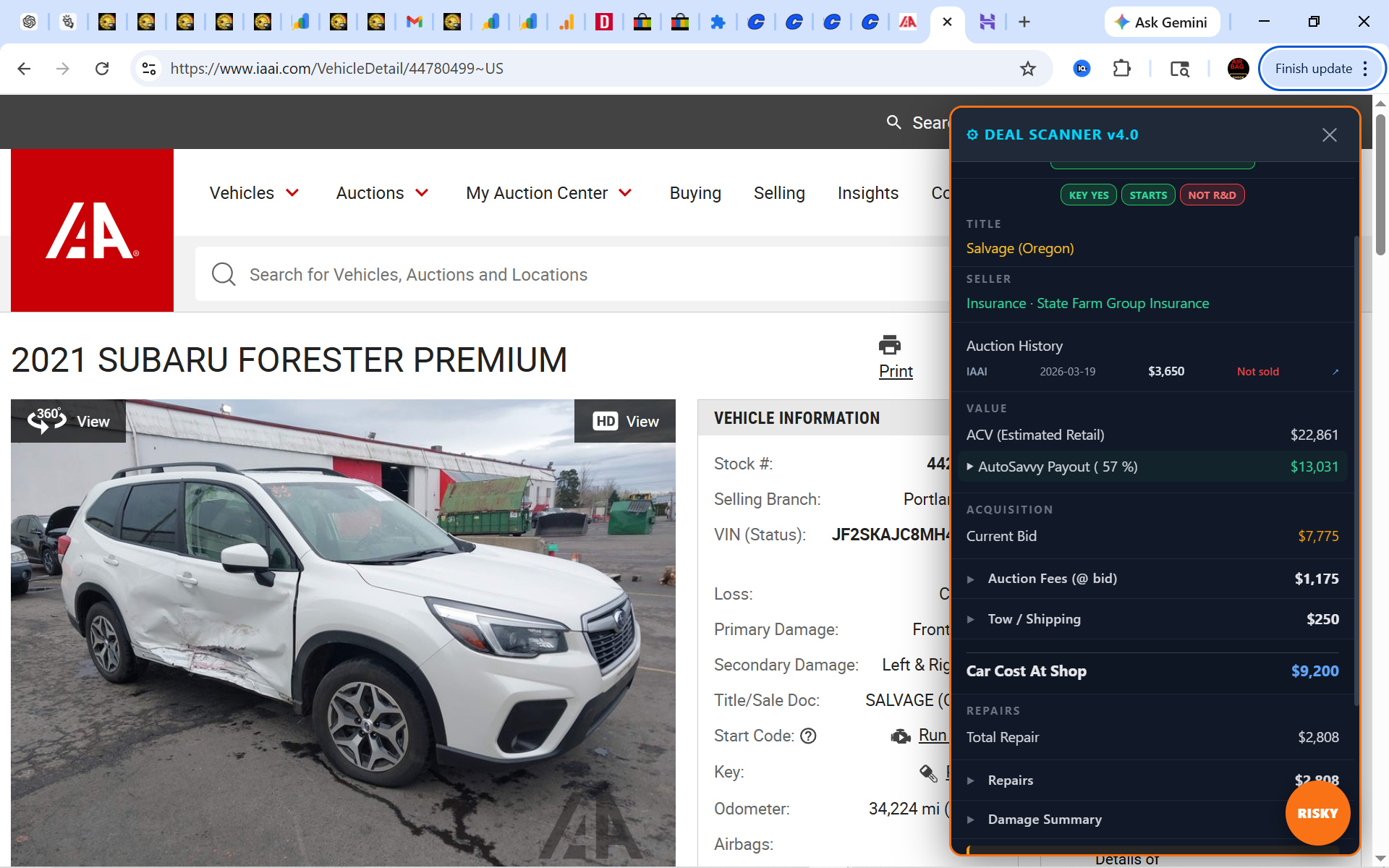
Same powerful analysis on Insurance Auto Auctions. Here’s Deal Scanner on a real IAAI listing.
Instant Deal Ratings
No more guessing. Deal Scanner tells you exactly where you stand.
How It Works
Three steps. Zero learning curve.
Install the Extension
Add Deal Scanner to Chrome for free. Takes 10 seconds.
Browse Auctions
Go to any vehicle page on Copart.com or IAAI.com like you normally would.
Get Instant Analysis
Deal Scanner panel appears automatically with full profit analysis, deal rating, auction history, and more.
Works On
Copart.com
Full support for all vehicle listings
IAAI.com
Full support for all vehicle listings
Join the Early Access List
Be the first to get new features, Pro access, and exclusive updates. We’re building the ultimate auction tool — and we want your input.
No spam, ever. Unsubscribe anytime. We respect your inbox.
✓ You’re in! We’ll keep you posted on new features and Pro access.
Stop Guessing. Start Scanning.
Join smart salvage buyers who use Deal Scanner to find profitable deals and avoid costly mistakes.
Install Deal Scanner — It’s Free